 1-361-589-1048
Table of Contents
- What Makes High Quality Screen Printing Different
- Screen Printing Inspection Checklist: What to Look For
- Screen-Printed Shirt Durability: Testing Long-Term Wear
- Screen Printing vs. Digital Printing: Quality Differences
- Best Shirts for Screen Printing: Fabric and Garment Selection
- Questions to Ask Your Screen Printer
- Common Defects and How to Spot Them
- Frequently Asked Questions
Last Updated: October 20, 2026
What Makes High Quality Screen Printing Different
High quality screen printing is defined by sharp edges, consistent ink coverage, and durability that survives repeated washing. It's the difference between a graphic that looks crisp on day one and fades after five washes versus one that holds its color and detail for years.
The core distinction comes down to three factors: the printing process itself, the materials chosen, and the quality control during production. At The Wits End, we focus on hand-screened apparel.
Most people assume all screen printing looks the same. It doesn't. A rushed job shows poor edge definition, uneven ink coverage, and colors that don't match the artwork. Quality printing shows crisp lines, consistent density, and colors that match the design file. The difference is visible to the naked eye.
Here's what separates mediocre from excellent:
- Edge sharpness: Crisp, clean edges around the design, not fuzzy or bleeding
- Color consistency: Uniform color density across the entire print
- Ink adhesion: Print doesn't crack, peel, or fade after washing
- Hand feel: Ink sits on the fabric without feeling stiff or uncomfortable
- Design detail: Fine lines and small text remain legible, not blurred
The printing method matters too. Screen printing uses mesh screens and squeegees to push ink through fabric. Digital printing sprays ink directly onto garments. Direct-to-garment printing offers photographic quality. Screen printing delivers bold, durable graphics that last.
Screen Printing Inspection Checklist: What to Look For
When you receive a screen-printed shirt, you should inspect it like a quality control professional. Look for specific issues that indicate either excellent craftsmanship or corners cut during production.
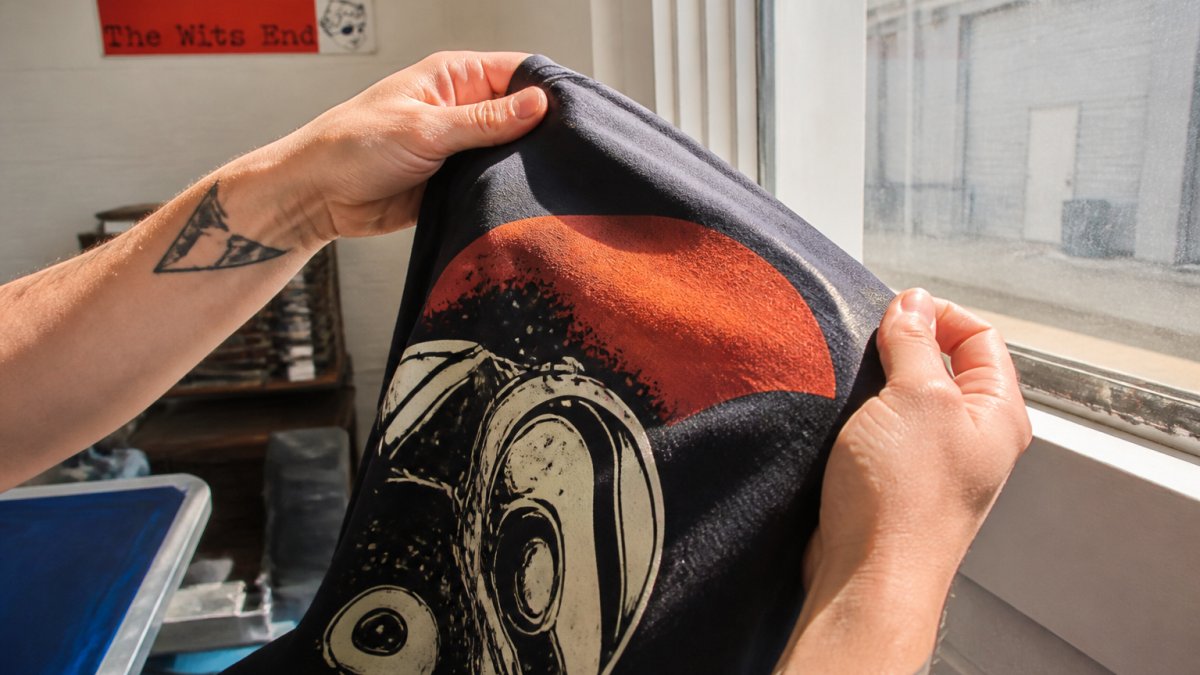
Check ink coverage and edge sharpness
Examine the edges of your design first. Run your finger along the border where the ink meets the blank fabric. High quality printing shows a clean line. Low quality shows fuzzy edges or ink bleeding into the fabric beyond the intended boundary.
Look at the ink coverage across the entire print. The color should be uniform, no thin spots, no areas where the base fabric shows through. Hold the shirt up to light. You shouldn't see the fabric texture showing through the ink.
Press your thumb against the print. Quality screen printing feels slightly raised but not stiff. The ink should move with the fabric, not crack when you bend it. If the print feels like plastic or cracks when folded, the ink application was too heavy or the curing temperature was wrong.
Assess color accuracy and consistency
Compare the printed colors to the original artwork file. The colors should match closely. Slight variation is normal depending on fabric color and lighting, but major shifts indicate a problem with color separation or ink mixing.
Check for color bleeding between layers. If your design has multiple colors, they should stay in their lanes. Bleeding happens when the mesh isn't cleaned properly between color applications or when ink viscosity is wrong.
Look for registration issues, misalignment between color layers. If you have a design with a black outline and a colored fill, the colors should line up perfectly. Slight misalignment means the screens weren't positioned correctly during printing.
Screen-Printed Shirt Durability: Testing Long-Term Wear
Durability is where screen printing proves its value. Many people worry that hand-screened apparel won't hold up.
Test your shirt's durability by washing it multiple times. Use warm water, not hot. Wash inside-out to protect the print. Dry on low heat or air dry. After 10 washes, inspect the print again. The edges should still be sharp. Colors should still match the original.
After 20-30 washes, the print might show slight fading. This is normal. True quality printing won't crack, peel, or flake.
The garment choice matters for durability. 100% cotton holds screen printing better than cotton blends. Higher quality fabric, heavier weight, tighter weave, provides a better surface for ink adhesion. Cheap, thin shirts don't hold prints as well, no matter how good the printing is.
Screen Printing vs. Digital Printing: Quality Differences
Screen printing and digital printing serve different purposes. Understanding the differences helps you choose the right method for your needs.
Screen printing uses mesh screens to apply ink directly to fabric. It works best for bold, solid colors and simple designs. The ink sits on top of the fabric, creating a tactile print. Colors are vibrant and durable. Screen printing is ideal for designs with 1-4 colors.
Digital printing sprays ink directly onto the garment using inkjet technology. It can reproduce photographic images and complex color gradients. The ink bonds with the fabric fibers. Digital printing offers unlimited colors in a single pass. However, the ink sits inside the fabric rather than on top, which can affect durability on dark garments.
Direct-to-garment printing is a type of digital printing optimized for apparel. It produces photographic quality on light fabrics. On dark fabrics, the colors appear muted because the ink can't show through. Direct-to-garment prints typically last 50+ washes but may show fading sooner than screen printing on darker shirts.
Screen printing delivers superior durability on dark fabrics. The ink sits on top, so colors remain vibrant. This is why The Wits End uses screen printing for our dark-colored designs.
| Printing Method | Best For | Durability | Color Vibrancy | Setup Cost |
|---|---|---|---|---|
| Screen Printing | Bold, solid colors; dark fabrics | 50+ washes | Excellent | Higher |
| Digital Printing | Photographic images; complex gradients | 30-40 washes | Good | Lower |
| Direct-to-Garment | Light fabrics; photo-quality designs | 40-50 washes | Good (light fabrics) | Lower |
Best Shirts for Screen Printing: Fabric and Garment Selection
Not all shirts are created equal for screen printing. The fabric type, weight, and weave directly impact how well the ink adheres and how long the print lasts.
Cotton content and fabric weight matter
100% cotton is the gold standard for screen printing. Cotton fibers accept ink readily. The fabric has enough texture to grip the ink without being rough. Blended fabrics, cotton mixed with polyester, don't hold ink as well. The polyester fibers resist ink adhesion.
Look for fabric weight measured in ounces per square yard. Heavier fabric (6+ ounces) holds screen printing better than light fabric (4-5 ounces). Heavier fabric has a denser weave, which provides more surface area for ink to bond with.
Budget shirts often use thin, loosely woven fabric. This fabric stretches easily and doesn't provide a stable surface for printing. The ink can't grip the fibers properly. After a few washes, the print cracks and fades.
Quality apparel brands use 6-ounce or heavier cotton. The fabric feels substantial and durable. Screen printing on quality blanks produces superior results.
Surface smoothness affects print quality
A smooth fabric surface allows the squeegee to apply ink evenly. Rough, textured fabrics create inconsistent coverage. Ink fills the texture valleys but sits on top of the peaks.
Pima cotton and combed cotton are smoother than standard cotton. They produce better print quality. The ink sits evenly on the surface, creating sharp edges and consistent color.
Ring-spun cotton is another quality option. The spinning process creates a smoother, stronger yarn. Ring-spun fabrics feel softer and hold prints better.
Avoid heavily textured fabrics like heather blends or vintage-wash finishes. The texture interferes with ink transfer. The print appears mottled and uneven.
Questions to Ask Your Screen Printer
Before ordering, ask your printer these questions. Their answers reveal whether they prioritize quality or just volume.
What ink do you use? Ask if they use plastisol or water-based inks. Both work, but they have different properties.
What's your curing process? Proper curing bonds the ink to the fabric permanently. Ask about their equipment and temperatures.
Do you do color separation in-house? Color separation is the process of breaking artwork into individual color layers.
What's your quality control process? Do they inspect every print or just random samples? Do they test prints before shipping?
What's your return policy if the print isn't right?
At The Wits End, we inspect every hand-screened shirt before it ships. We use professional-grade inks and proper curing equipment. We handle color separation in-house.
Common Defects and How to Spot Them
Screen printing defects fall into predictable categories. Learning to spot them helps you identify quality issues before they become problems.
Ink bleeding occurs when ink spreads beyond the intended boundary. The edges look fuzzy instead of crisp. This happens when the mesh is too coarse, the ink is too thin, or the squeegee pressure is too high. It can also result from poor color separation.
Registration issues appear as misalignment between color layers. If your design has a black outline and a red fill, they don't line up perfectly. The outline might be offset from the fill. This happens when screens aren't positioned correctly or the garment shifts during printing.
Ink cracking happens when the ink layer is too thick or not cured properly. When you fold the shirt, the print cracks like dried mud. This indicates either over-application of ink or insufficient curing temperature.
Color fading occurs faster on low-quality prints. After a few washes, the colors look washed out. This happens with under-cured prints or incompatible ink and fabric combinations.
Ink adhesion failure is when the print peels or flakes off. This means the ink didn't bond properly with the fabric. It can result from dirty garments, incompatible fabric treatments, or wrong ink type for the fabric.
Pilling on the fabric surface can make prints look rough and damaged. This is a fabric quality issue, not a printing problem. It indicates cheap, low-quality blanks.
Uneven coverage shows as thin spots where the base fabric shows through. This happens when the squeegee doesn't apply consistent pressure across the screen or when the ink viscosity is wrong.
Identifying high quality screen printing comes down to knowing what to look for. Inspect the edges, check the color consistency, feel the hand of the print, and test durability through washing. Ask your printer the right questions before ordering. Understand the difference between screen printing, digital printing, and direct-to-garment printing so you choose the right method for your design.
When you choose a printer like The Wits End that prioritizes craftsmanship and uses professional-grade materials, you get apparel that reflects your values and survives repeated wear. Get started with The Wits End and experience hand-screened apparel that holds its color, maintains sharp detail, and proves that quality printing is worth the investment.
Frequently Asked Questions
How can you tell if a screen print is high quality?
High quality screen printing shows sharp, clean edges with no ink bleeding into surrounding fabric. Run your finger over the design, it should feel smooth and firmly adhered, not tacky or flaking. Check that colors match the artwork accurately, ink coverage is even, and there are no thin spots or pinholes. A quality print also has consistent color across the entire design with no streaking or fading.
How can you tell whether a screen print will last?
Before washing, inspect the print's adhesion by gently rubbing it; a well-cured print won't transfer ink to your finger. Check that the garment itself is durable (100% cotton or a quality cotton blend) and properly finished. Ask the printer about their curing process.
What's the difference between screen printing and digital printing in terms of quality?
Screen printing offers vibrant colors on solid designs. Digital printing excels at photographic detail and complex color gradients. Screen printing requires separate passes for each color, while digital prints in full color in one step.
What should you check on a shirt before ordering screen printing?
Verify the fabric is smooth and tightly woven, 100% cotton or a high-cotton blend works best. Check that the garment surface is flat and free of texture that could interfere with ink adhesion. Examine the shirt's weight and construction quality; heavier, well-made garments hold prints better. Ask about their quality-control process.