 1-361-589-1048
Table of Contents
- Why Graphic Tee Cracking Happens (and How to Stop It)
- How to Wash Screen Printed Shirts: Step-by-Step
- Best Way to Dry Graphic Tees Without Cracking
- How to Prevent Shirt Graphics from Peeling: Care by Print Method
- How to Repair Cracks in T-Shirt Print (and When to Let Go)
- Causes of Cracking Beyond Laundry: Print Quality, Curing, and Fabric Stretch
- Your First-Wash and Routine Care Checklist
- Conclusion
- Frequently Asked Questions
Last Updated: October 15, 2026
Why Graphic Tee Cracking Happens (and How to Stop It)
Graphic tee cracking is the breaking and flaking of the printed ink layer, and it almost always starts with heat, friction, and harsh chemicals.
Most cracking is preventable with a few habits that take about two extra seconds per load.
Most care guides treat all prints the same, but a thick screen print and a thin DTG print fail differently and need different handling.
The 7 rules below cover washing, drying, print-type care, and what to do when a print is already damaged.
How to Wash Screen Printed Shirts: Step-by-Step
The best way to wash screen printed shirts: turn them inside out, use cold water on a gentle cycle, and skip bleach and fabric softener. These three steps are the single biggest thing you can do to extend print life.
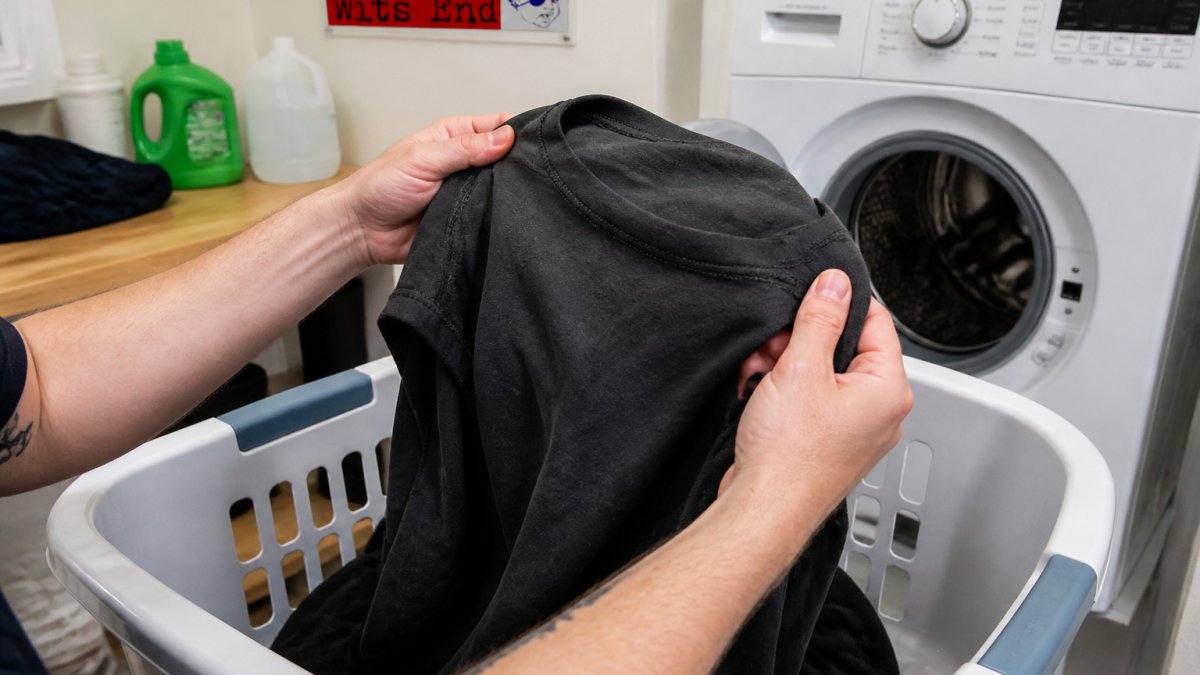
Step 1: Turn the Shirt Inside Out Before Every Wash
Turning the shirt inside out puts fabric between the print and everything else in the drum, absorbing the rubbing that would otherwise hit the ink.
Most print damage comes from friction, not detergent: zippers, buttons, and rough towels act like sandpaper on a printed image.
Do this every single time. Not just for the first wash.
Step 2: Choose the Right Water Temperature and Cycle
Cold water is right for printed clothing. Hot water softens ink, speeds fading, and shrinks cotton, which stretches the print and starts cracks.
Set your machine to cold and a gentle or delicate cycle, it spins slower, so there's less agitation against the print.
If your machine has a "hand wash" setting, that's even better for a favorite printed shirt.
Step 3: Pick a Mild Detergent (and Skip the Extras)
Mild detergent cleans without stripping ink; harsh detergent and bleach break down the print's bond with the fabric.
Skip these entirely:
- Bleach, which fades and weakens ink
- Fabric softener, which coats the print and can lift edges
- Dryer sheets, for the same reason
Use a small amount of liquid detergent, less than you think.
Best Way to Dry Graphic Tees Without Cracking
The best way to dry graphic tees is to air-dry them. If you use a dryer, use low heat and pull the shirt out slightly damp. High heat is the fastest way to crack a print.
Heat makes ink brittle, and brittle ink breaks apart with normal wear.
Here's how we'd handle it:
- Hang dry or lay flat, inside out
- Keep the shirt out of direct sunlight for long stretches
- If using a dryer, choose the lowest heat setting
Over-drying is sneaky: an extra 20 minutes in a hot dryer does the same damage as a hot-water wash.
How to Prevent Shirt Graphics from Peeling: Care by Print Method
How to prevent shirt graphics from peeling depends on the print method. Screen printing, DTG, and heat transfer each fail differently, so each needs slightly different care.
| Print Method | Ink Layer | Main Risk | Key Care Rule |
|---|---|---|---|
| Screen printing | Thick, raised plastisol or water-based ink | Cracking from flex and heat | Cold wash, low heat dry |
| Direct-to-garment (DTG) | Thin, water-based ink absorbed into fabric | Fading and wash-away | Cold wash, air-dry only |
| Heat transfer | Vinyl or film layer | Peeling at edges | No heat, no iron, no dryer |
Screen Printing: Thick Ink, Gentle Care
Screen printing lays down a thick, slightly raised ink layer. Plastisol inks cure into a plasticized film; water-based inks bond into cotton fibers. That thickness is why it lasts, and why it cracks if stretched or heated.
Cold water, gentle cycle, and low-heat drying keep the ink flexible. Avoid stretching the shirt while wet. Stiff and plastic-like means plastisol; soft and slightly absorbed means water-based, which tolerates folding better but fades faster with repeated hot washing.
Direct-to-Garment (DTG): Thin Print, Extra Care
DTG prints are thinner, sit closer to the surface, and fade faster if you're rough with them. The water-based ink bonds into the cotton fiber, so it's more sensitive to detergent residue and agitation than to heat alone.
Air-drying is safest, and DTG prints do better with less detergent since heavy washing wears the ink down. A faint halo from pretreat solution fades with the first wash, that's normal, not a defect.
Heat Transfer: Sensitive to Heat and Friction
Heat transfer prints are a vinyl or film layer pressed onto the shirt and are the most vulnerable to heat. The adhesive softens above roughly 300°F, within range of a hot dryer or iron.
Never iron directly over a heat transfer print or put one in a hot dryer. Lifting edges are the first sign the bond is failing. Wash inside out on cold and air-dry, a single hot dryer cycle can lift edges that survived dozens of cold washes.
How to Read a Care Label When It Conflicts With This Guide
Labels are written for the garment as a whole, not the print, so they sometimes conflict with print-specific advice. Read them in this order:
- Fiber content first. 100% cotton tolerates cold wash and low heat; cotton/poly blends dry faster and shrink less, so air-drying is easier.
- Then the wash symbol. A tub with a hand inside means hand wash or delicate. A tub with a line under it means permanent press. A tub with an X means do not wash, rare on tees but common on some decorated garments.
- Then the dry symbol. A square with a circle means tumble dry; a circle with one dot is low heat, two dots medium, three high. A square with a circle and an X means do not tumble dry.
- Then any print-specific note. Some makers add "wash inside out" or "do not iron decoration." That note overrides the general symbols for the printed area.
When the label and this guide disagree, the label wins. The maker knows how that specific print was cured and bonded.
How to Repair Cracks in T-Shirt Print (and When to Let Go)
How to repair cracks in t-shirt print comes down to how bad the damage is. Light surface cracking can sometimes be softened, but deep cracks that expose fabric usually can't be fixed. Identify the failure mode first, because each responds differently.
- Surface cracking: fine lines in the ink film, fabric not visible. Often cosmetic and stable.
- Deep cracking: cracks that show the shirt color through them. The ink film has physically split.
- Edge peeling: the print lifting at the border, usually on heat transfers or poorly cured screen prints.
What Actually Helps (and What Makes It Worse)
Options people try, ranked safest to riskiest:
- Low-heat press with a pressing cloth. Place a clean cotton cloth or parchment over the print and press with an iron on the lowest setting for 10-15 seconds. This can re-bond minor lifting on heat transfers and plastisol screen prints. It will not close deep cracks.
- Fabric-safe adhesive for small peeled edges. A tiny dot of flexible fabric glue under a lifted corner, pressed flat and left to cure per the product label, can hold an edge down. Rigid glues crack again as soon as the shirt flexes.
- Acetone on a cotton swab for tiny touch-ups. Acetone can soften plastisol ink slightly so a hairline crack can be pressed closed. It also dissolves some synthetic fabrics and removes dye, so test on an inside hem first and use it only on 100% cotton plastisol prints. Never use it on DTG or heat transfer.
These are temporary fixes that slow damage rather than reverse it. A repaired print usually cracks again along the same lines within a few washes.
When to Stop Repairing
Once a print is badly cracked, it's done, the ink has lost its bond with the fabric. The shirt becomes a work shirt, a sleep shirt, or a rag. That's not a failure; the print hit the end of its normal life.
A useful rule of thumb: if more than about a quarter of the printed area shows fabric through the ink, repair is not worth the effort.
How to Keep a Damaged Print From Getting Worse
If you're not ready to retire the shirt, change how you wash it:
- Wash it alone or with like colors, inside out, on cold and delicate.
- Skip the dryer entirely; heat accelerates crack propagation.
- Fold along the print rather than across it when storing.
Causes of Cracking Beyond Laundry: Print Quality, Curing, and Fabric Stretch
Laundry habits aren't the only cause of graphic tee cracking.
Curing is the heating step that sets the ink after printing.
Print quality matters too. A thin, uneven ink layer wears out faster than a thick, even one.
Fabric stretch is the third factor. Cotton shrinks and stretches with heat and wear, and every stretch pulls on the ink.
This is where buying from a maker who controls the print process pays off.
Your First-Wash and Routine Care Checklist
Run this checklist for the first wash and every wash after, two minutes that adds years to a print.
First wash:
- Wash alone or with similar colors, inside out
- Use cold water and a gentle cycle
- Use a small amount of mild detergent
Every wash after:
- Turn inside out before it goes in the hamper
- Keep printed shirts out of heavy loads with zippers or towels
- Check the care label for any manufacturer exceptions
Conclusion
Printed shirts fail for predictable, avoidable reasons. Cold water, a gentle cycle, mild detergent, and low heat handle most of it. The rest is knowing your print method and buying from a maker who cures prints properly.
If you're tired of prints that crack after a few washes, The Wits End makes hand-screened and direct-to-garment apparel built to last. Our graphics are cured for durability, our fits run comfortably up to 5XL, and every design comes from a veteran-owned shop that cares about the details.
Frequently Asked Questions
How to keep letters from peeling off shirts?
Turn the shirt inside out, wash in cold water on a gentle cycle, and use mild detergent. Skip bleach and fabric softener, which break down the adhesive or ink bond. Dry on low heat or air-dry. If letters start to lift, press the shirt with a cool iron on the reverse side or use a heat press for a few seconds. These steps prevent graphic tee cracking and peeling.
Should you turn graphic tees inside out before washing?
Yes. Turning the shirt inside out reduces friction between the printed image and other garments in the wash. That friction is a leading cause of cracking, peeling, and fading. It also protects the print from snagging on zippers or buttons. Make it a habit every single wash, not just the first one.
Can heat from a dryer cause a shirt graphic to crack?
Yes. High heat makes the ink or transfer brittle, so it cracks when the fabric stretches or folds. Always use the lowest heat setting or air-dry. If you must use a dryer, remove the shirt while it is still slightly damp to avoid over-drying, which is a common cause of graphic tee cracking.
Can you fix cracks in a T-shirt print?
Small cracks can sometimes be improved with a heat press or an iron on low heat with a pressing cloth, but deep cracks in screen-printed or DTG shirts usually cannot be fully repaired. For heat-transfer vinyl, you can try re-pressing with a sheet of parchment paper. If the damage is widespread, the print is likely beyond saving. Focus on prevention for your next favorite tee.